





My sweet friends Heather from Setting For Four and Jessica from Mom 4 Real got me in gear on getting my INTEREST LIST going but all of the info on how to do it was confusing. I played around until I figured it out.
If the tires just screeched to an abrupt stop and you are like WHAT? What is an interest group, let me back up.
Mark Z, I guess he isn’t making enough money since his whole stock thing was a flop and if you want more than 10% of your readers to see your posts you need to pay PER POST. Yep, you read that right. Only 10% of your readers are seeing every post you put up with the new facebook algorithms. GRRRRR!!!! UGH!!!!!! We may be small business (blog) owners but SMALL WE ARE. I am not paying PER POST–sorry Mark. So, what are we to do?
The NEWS has been all over facebook and bloggers are outraged.This may not be the first time you have read this, maybe it is the first time but you can FIX THIS so you can get the feed of all the bloggers, family, friends that you want to see on a regular basis and not have your feed clogged with thousands. HOW you ask–well here is what I did and this is what you need to do.
STEP #1 Follow ITS SO VERY CHERI facebook page. You can pop over and make sure you are following me, leave facebook open so you can set your group up right now. It is fast and easy and you won’t forget about it if you do it right now.
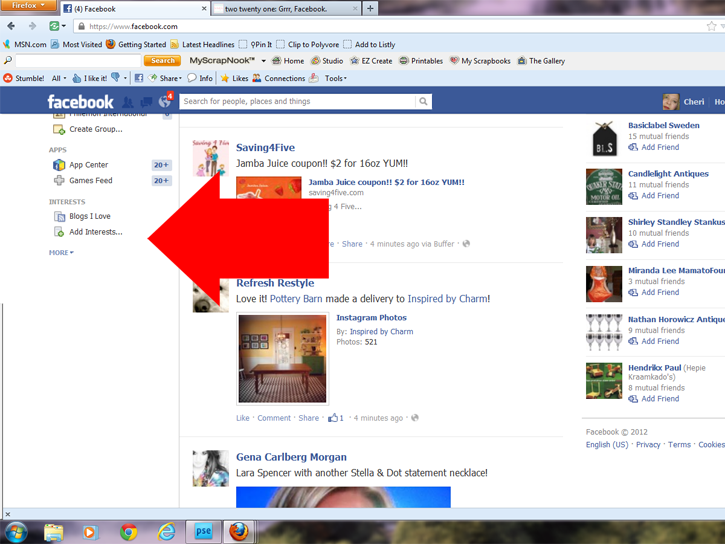

STEP #2 Go to your HOME page on facebook and click on the side bar where it says ADD INTEREST GROUPS.
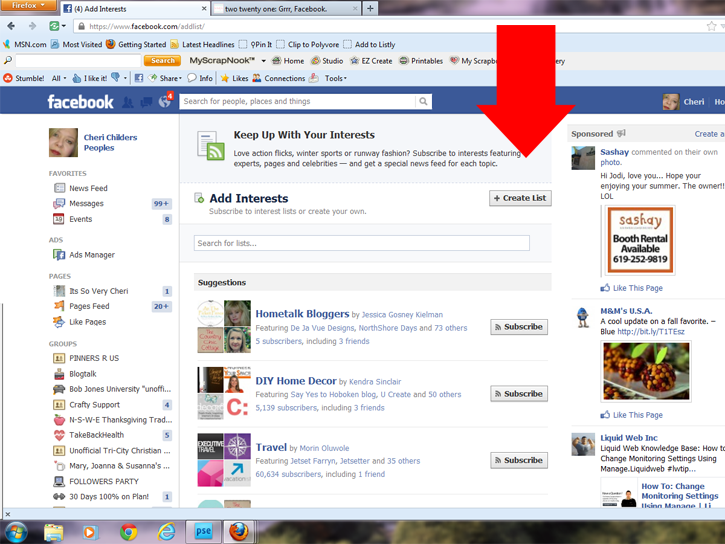

STEP #3 You want to CREATE A LIST. You can have multiple lists to organize your friends. You can have a list of facebook pages. You can have a list for family and friends. You pick what you want to call each list and who goes into the list.
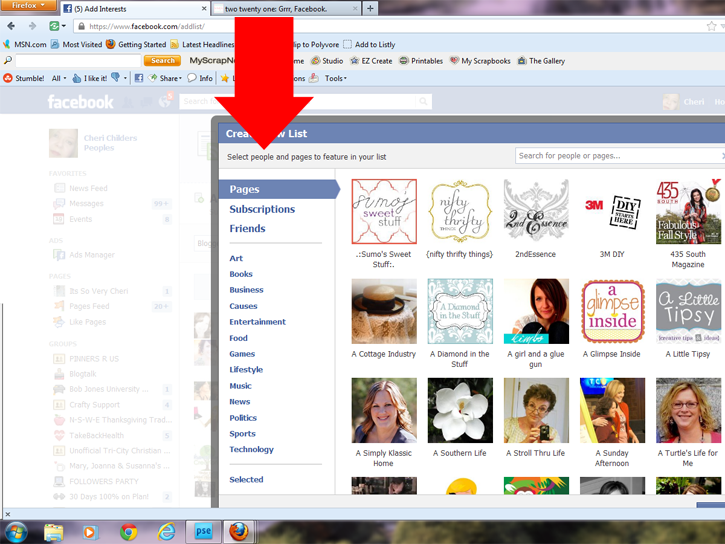

STEP #4 You click on what you want to appear, example: Subscribers so you can add to the LIST of Bloggers.
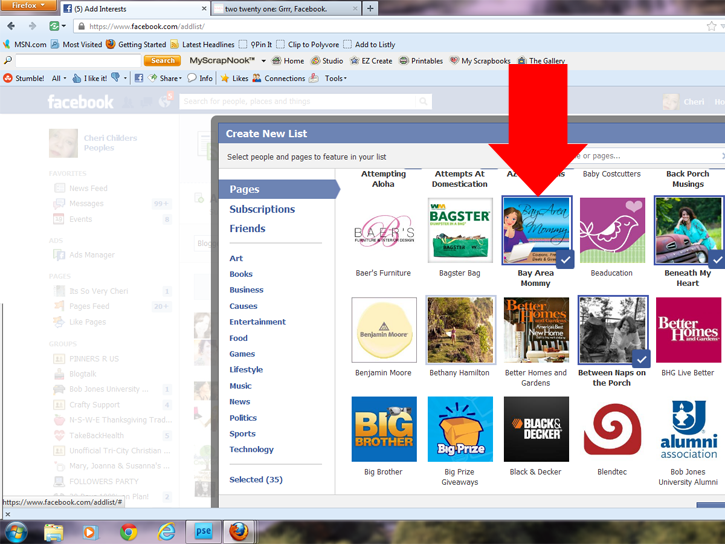

–As you click on the ones you want added to that group you will see a blue box appear around the person being added to your list.
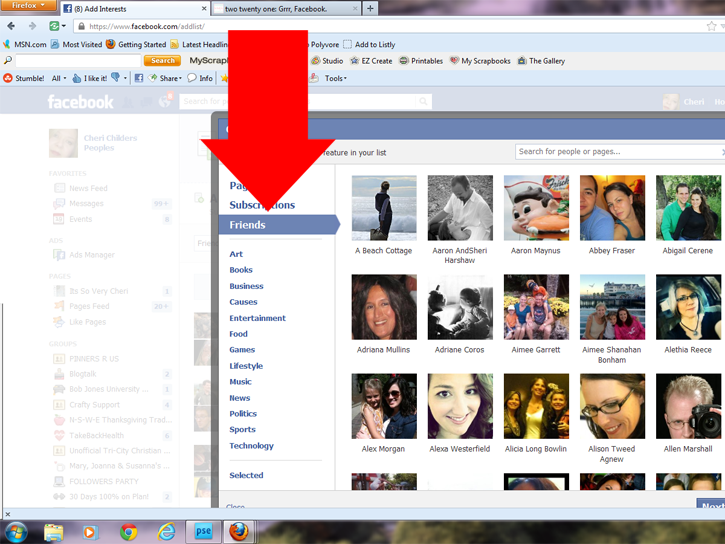

STEP #5 Once that list is completed, you can then create another by clicking on Friends to create another group.
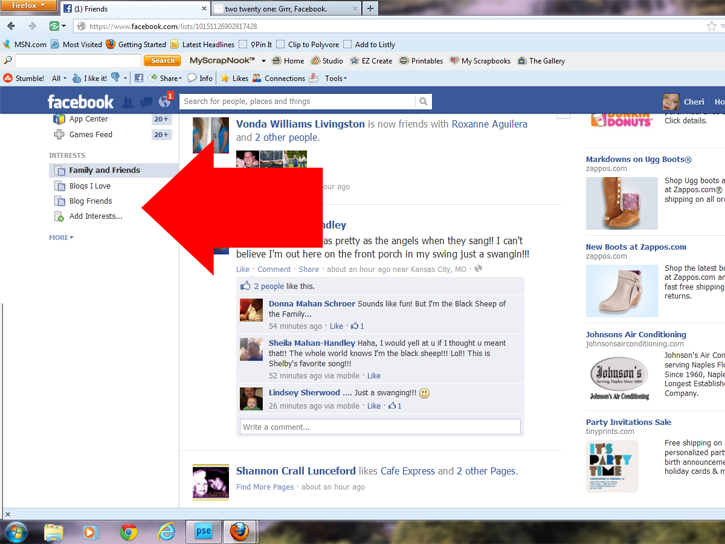

–Now those LISTS will appear on your side bar and you can just click the side bar to check each group.
If you find that someone isn’t popping up in your lists go check to make sure that you added them in, you probably forget them or they just aren’t posting updates.


{ 10 comments… read them below or add one }
Great Post! I’ll be sharing, all over. I do this already for friends and family but will begin doing this for others stuff!
Hilani-Handmade by Hilani recently posted..Easy Trail Mix Bark via {Taryn w/Design, Dining + Diapers}
Thanks for the info! Sharing on my FB page today.
Thanks for this great post! Will be sharing with friends, family, bloggers, etc!
I just started and thought I would share so others know how to do it too.
Thanks Erin. I hope it helps everyone.
Anna-I’m glad you like it and think it will be helpful.
Cheri, I set mine up last night after playing around with it a little. You’ve written a real, clear explanation about how to do it!
Jane @ Cottage at the Crossroads recently posted..Inspiration from the Southern Bloggers Conference
Thanks so much, Cheri ~ now it makes sense to me!
Mary Beth @ Cupcakes and Crinoline recently posted..Halloween Treat Jar with Ghost and Pumpkin Peeps
Things are changing so fast!! Thanks for this post xox
Anne recently posted..ModPodge Away! My Tallboy Turned Apothecary
Great tutorial Cheri!! Everyone needs to read this!
Heather recently posted..Easy Bling Pumpkin DIY