


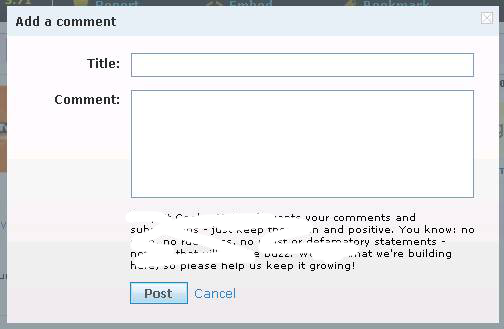


How do you have your comments set to show on your blog?
Go see real quick.
Go to Dashboard
Go to “Settings”
Go to “Comments”
Go to “Comment Form Placement”
What do you have checked?
You know that pop-up window you have it set to? That little dooker causes a lot of people to have to take extra steps. What happens is this:
You read the post, and then click on “Post Comment’
Then the pop-up window comes up.
Then another little pop-up box comes up and says “This page has secure and non secure items. Do you want to display the non secure items?
Then you have to either press “yes” or “cancel”.
Then it takes you to the comment box.
You write your comment and press “post”.
Then a little bar comes up at the top that says “Your comment has been posted. It may a few minutes to show up on the original post”
Then that little box pops back up that says “secure, non secure, blah, blah, ,whadda you want to do?”
Then you have to tell it what to do again.
Then you have to hit the red X to close the comment box.
So let’s see, that’s about 7 steps just to post a comment. Whew! I do it, but I gotta tell ya, sometimes I just say “nevermind, it wasn’t that important anyway.”
If yours was the only blog I was visiting and commenting on it wouldn’t be a big deal, but I suspect that many of you are like me and you set aside some blog time just to visit all of your favs at once.
It can get frustrating. So if some of you wonder why you may see my visits in your analytics but I’m not leaving comments, this is another reason why.
If you have a pop-up window AND word verification, and I still leave a comment on your post – then please read it because I must have really wanted to say something about your post that I want you to see.
What to do?
I beg you, please, change your comment form placement to “Embedded below post”.
I’ve had a few people say that they don’t want all of the comments showing under their post because it makes the post so much longer. But it doesn’t. If someone wants to read your comments, all they have to do is click on the “comments” link under your post. It will then open for them to see all of the comments. If that same blogger revisits your post in the same day from the same computer, then all of the comments will still be open under the post. If someone only reads your post and doesn’t hit the “comments” link underneath, then it won’t show them automaticaly.
When you embed the comment form under your post, all a visitor has to do is hit “Post Comment”, and then fill in the comment box. That’s it.
EASY PEASY.
~~~~~~~~~~~~~~~~~~~~~~~~
This tip is from Polly.


{ 2 comments… read them below or add one }
Just found your blog, and love it! I’m a fairly new blogger, and love all the tips that you share. Let me know if you have any tips for my blog if you happen to visit me! I do love suggestions for a better site! Here is my blog address: http://www.bymarilyn.blogspot.com
Hey Cheri…
Thanks for this post, I have been wondering how to do that!! Sorry it’s taken me so long to get back to you and all your comments…thanks for them by the way…it’s been busy and life has been very time-consuming around here, blog time has been hard to come by if you can imagine!!! Can’t wait til I can get a more regular schedule and get back into the blogosphere more regularly!