


I am so excited to be able to guest post on It’s So Very Cheri!!
What an honor.
I’ve been following her blog for awhile now and am so excited to see what fun things her new site brings!
 My name is Brandy and I love being a stay at home mother to three precious children. We are a Coast Guard family and are enjoying the ride! We’ve lived in California, Alaska and Ohio.
is a compilation of the things I love to do in my free time. I create lots of crafts with my children.
I also have recipes, party ideas and decorating ideas.
Our creative fun really took off when we lived in Kodiak, Alaska. We loved living up there. If you haven’t been to Alaska, you must plan a trip! There is no beauty that can compare. We lived just minutes from the ocean and enjoyed many beach days, sunny days, and fun outdoors. But there is always a catch—otherwise everyone would be living up there! Wind, rain, fog, and already long and dark winters created lots of time for indoor crafts. Oftentimes with friends! My kids were the perfect ages to start doing fun projects and quickly caught the creative bug! We’ve been having a blast ever since.
We are now living in the Columbus, Ohio area. Kaylee, the newest addition to our family 17 months ago has caught the bug as well. We can’t keep that child away from markers, crayons, walls to color on, etc. 🙂
Here are some of the ideas featured on my blog:


Here is a fun tutorial that I’d like to share with you today! This clock came from Hobby Lobby. It was $24.99, marked down to $2.49. You couldn’t even buy the metal easel for that price! My husband found it and thought that I could do some sort of photo collage on it. Yes, he’s crafty too…but in a manly way 🙂 We bought it, and it sat in my craft closet forever. I forgot about it until recently when I found out that Costco prints out large collages and photos for such great prices!

You can create a collage online at Costco, but they only do the grid ones. I wanted one that looked a little more random so I created one on Picasa. You can download Picasa for free. Then I saved it to my computer and uploaded it to Costco online and had them print it out in a 12×12 print. $2.99!!
The clock worked, but was missing hands. I had a hard time finding hands to fit since it was a different brand than the replacement ones I was looking at. So I bought a clock kit at Michael’s with black hands to use for this project.

I placed the photo on the clock and found the center point. I marked it and cut it out so that the clock kit could slide through. I was lucky that it was already pre-drilled for the previous clock kit.

Then I traced around the clock and cut out the photo.

My trusty little helper, Aaron, applied a thin coat of mod podge to the face of the clock and laid the photo on top.
 After that dried, I applied another coat of mod podge to the top of the clock and then assembled the clock kit and black hands. The clock kit was super easy to add and had great instructions. You could make a clock out of ANY hard surface. Just drill a hole (if it doesn’t already have one) and you are good to go!

The kids love finding their photos in the collage!
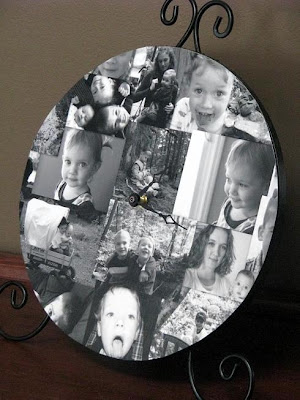
That’s it! A fun and personal addition to our home. Moral of the tutorial? Run to the clearance section at your local craft store!! You never know what you will find.
Thanks for looking! And THANK YOU Cheri for sharing your blog with me today!
Stop on by Home Sweet Home for family recipes, kid friendly crafts and project for Mommy!


{ 6 comments… read them below or add one }
That is such a fun idea. I see a clock being made in my future! Thanks for the great idea.
That clock is seriously awesome! I love your site and was so happy to see you featured here this morning. How fun!
Thanks for the sweet comments and thanks for hosting this Cheri!!
I had it scheduled for this morning and it didn’t go up so I need to look and see if my time zone is different in settings. this was my first pre-post that I scheduled. Normally I would be checking it but I had several things on my plate this morning.
Cheri
Love this idea…it turned out great!!!
We will have tutorials every Thursday.
Cheri